
Sonora
Swipe your headset to jump between every browser tab that's playing. No keyboard, no hunting for the tab.
Swipe your headset to jump between every browser tab that's playing. No keyboard, no hunting for the tab.
Three tabs are making noise: a video, a podcast you paused, a radio stream from Tuesday. Swipe forward on the earcup and you are on the next one — it starts, the one you left pauses. No alt-tab, no hunting for the little speaker icon, no keyboard at all. Nothing else does this: media keys reach one app, and a "next track" inside a tab just plays that site's next video.
Forward and back step through every audible tab in order, starting the next and pausing the one you left. Your open tabs become a queue you move through from your ear.
Ad break, waffle, a bit you want again: hold forward to skip ahead, hold back to go back, ten seconds a go — on the tab you're actually hearing.
Every headset can pause something. This one pauses what you're listening to, instead of whichever app macOS last called "now playing".
And when you do want the screen, the popup is there: every audible tab in one list, transport and volume for each, your headset's battery on the same card.
Your Mac knows how much charge is left in your headset. To see it you open the Bluetooth menu, hover the device, and read a submenu — and the figure waiting there is often hours old. HeadsetCompanion puts a fresh one where you're already looking.
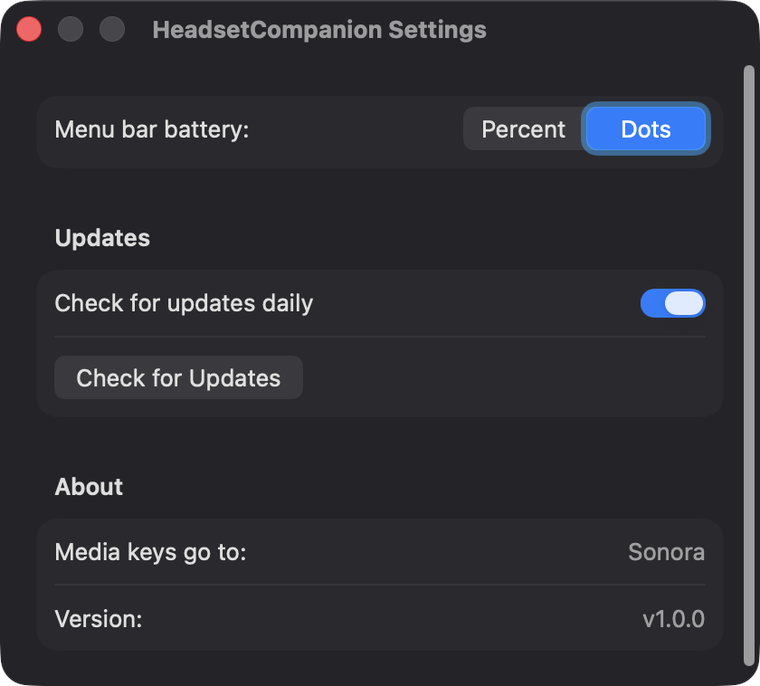
The battery sits under a headphones glyph in one menu-bar slot, narrower than the clock. Five green dots by default, or a small percentage if you'd rather have the digits.
Sony, Bose, AirPods, Jabra, Anker, the cheap pair from the airport. Nothing in the app names a device: it reads what the system Bluetooth stack reports, and falls back to the standard BLE battery service.
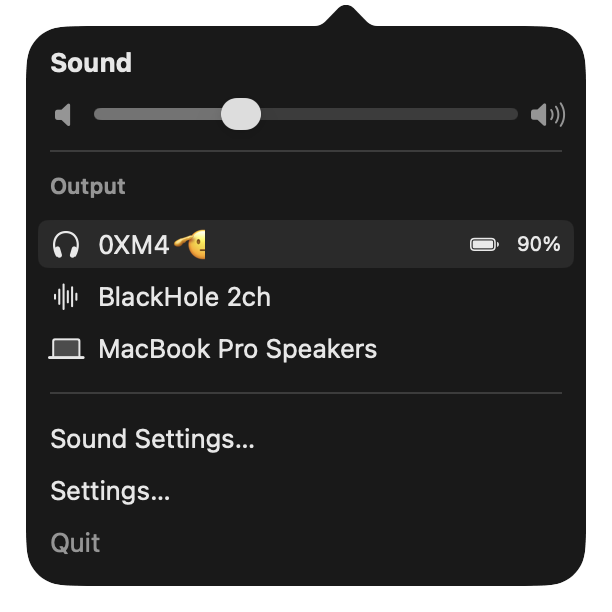
One click gives you the volume slider and every output device, each headset carrying its own battery on its row. No more Control Centre, then Sound, then hover.
A Mac for the built-in speakers, the AirPods shape for AirPods, headphones for everything else over Bluetooth. Switch output and the menu bar follows within the same second.
A once-a-day look at this repository's Releases page, then a new version installed in place. No prompts, no installer, no admin password — and an off switch in Settings if you'd rather do it yourself.
One item in the menu bar, one menu under it, and a Settings panel you'll open once.

A minute, and one warning from macOS that you get past with a right-click.
The Download for Mac button gives you a file ending in .dmg, in your Downloads folder.
Double-click the downloaded file. A window opens with the HeadsetCompanion icon and an Applications folder. Drag one onto the other, then close the window.
In your Applications folder, right-click HeadsetCompanion and choose Open, then Open again in the dialog that appears. Double-clicking it the normal way will only be refused. After this first time, it opens like anything else.
Click the new menu-bar icon: volume, your output devices, and the battery for whichever headset is connected. If the number looks wrong for a second, give it ten — that's one poll.
In Settings…, turn on Start at login. macOS may ask you to approve the item once under System Settings → General → Login Items.
Turn Start at login off in Settings, then drag the app to the Trash. Its preferences go with these two lines:
rm -rf /Applications/HeadsetCompanion.app
defaults delete io.sonora.headsetcompanionXcode 15 or newer, Swift 5.10, macOS 13+. The test suite runs offline.
git clone https://github.com/YamineRL/sonora.git
cd sonora
swift test
./build-app.shShort version: nothing. There is nowhere for it to send anything.
Nothing to sign up for, no analytics, no crash reporting, no identifiers. Nothing about your devices, your listening or your Mac leaves the machine.
The only request the app can make is an unauthenticated read of this repository's public releases page, once a day, to see whether a newer version exists. Untick Check for updates daily and even that stops.
The little HTTP server the extension reads from binds to 127.0.0.1. Nothing outside your Mac can reach it — not another machine on your network, not a website.
About 3,000 lines of Swift, all of it in the open. If you'd rather not trust a stranger's binary, build the app from source and run that instead.
The details people usually ask for before downloading anything.
| Detail | Answer |
|---|---|
| Price | Free, both halves, with the source in the open |
| Requires | macOS 13 or newer, Apple silicon |
| Size | About 500 KB, delivered as a .dmg |
| Signed | No — first launch needs right-click → Open |
| Headsets | Any that reports a level to macOS, plus BLE battery service |
| Refresh | Every 10 seconds, from a fresh read |
| Updates | Daily check, installed in place; switchable off |
| Network | That update check only; battery server on 127.0.0.1 |